Attorney time tracking software is the purpose-built tool law firms use to record billable hours, manage client expenses, and generate accurate invoices automatically. It’s a direct replacement for manual timesheets, designed to capture every billable minute with precision and turn that time into revenue.
Why Manual Time Tracking Is Costing Your Firm

The image of a lawyer buried under a mountain of paper timesheets at the end of the month isn’t just a cliché—it’s a snapshot of lost revenue and administrative mayhem. Manual time tracking, whether done on spreadsheets or legal pads, is the silent profit killer lurking in far too many modern law firms.
This old-school method relies on memory, which is notoriously unreliable after a long day of intense legal work. Every forgotten five-minute phone call, unbilled email, or moment of research that slips through the cracks is a direct financial loss. These small oversights accumulate fast, creating a massive gap between the work performed and the revenue collected.
The Hidden Costs of Old Habits
The fallout from manual timekeeping goes far beyond simple forgetfulness. The administrative drag alone is staggering, forcing attorneys and support staff to burn countless non-billable hours trying to decipher handwritten notes, reconstruct timelines, and manually punch data into billing systems. This tedious work is a breeding ground for human error, leading to inaccurate invoices that can quickly erode client trust.
The legal industry is already making a decisive move away from these dated practices. A clear majority of law firms—a full 67%—are now using some form of attorney time tracking software. This isn’t a minor trend; it’s a fundamental shift driven by the well-documented financial bleeding caused by manual systems.
A Strategic Shift, Not Just a New Tool
Thinking of this software as just another program on your computer misses the point entirely. Adopting a dedicated time tracking solution is a strategic business decision that directly strengthens a firm’s financial health, operational agility, and professional integrity. It’s about replacing guesswork with precision.
By capturing every billable moment with digital accuracy, firms not only boost revenue but also create the transparent, detailed invoices that build unshakable client trust and reduce payment friction.
This guide will show you exactly how making this transition is essential for any competitive firm today. We’ll break down the features that actually matter, build a clear business case for automation, and provide a roadmap for choosing and implementing the right solution for your practice. It’s also a crucial step in addressing the modern challenges in ethics for lawyers by ensuring your billing practices are consistently fair and transparent.
Decoding Core Software Features for Law Firms
Picking the right time tracking software is less about a technical checklist and more about understanding how each feature solves a real-world headache for your firm. Think of these features as digital specialists, each designed to perfect a specific part of your workflow.
At its core, the software has to capture time flawlessly. But how it does that is what separates a basic timer from a game-changing business asset.
Automated Time Capture: Your Digital Shadow
Imagine having a paralegal shadow you all day, silently noting every single billable action. That’s the magic of automated time capture. This feature runs quietly in the background, logging activities like drafting documents, sending emails, or conducting online research, and then intelligently suggests time entries.
This passive approach is the direct antidote to the biggest source of lost revenue: faulty human memory. No more starting and stopping timers or trying to piece your day back together at 6 PM. The result is a dramatic increase in captured billable time—those small five-minute tasks that, when added up, represent a huge chunk of a firm’s unbilled work.
By automatically documenting activities, firms can save up to 15+ hours per attorney each month on administrative tasks, turning that saved time directly into billable hours or more client-focused work.
Detailed Activity Logging for Ironclad Invoices
Vague invoices breed client distrust. When a client sees a line item for “Legal Services – 4 hours,” questions are almost guaranteed. Top-tier software solves this by prompting for detailed activity logs. Every time entry is tied to a specific, descriptive narrative.
This isn’t just about logging hours; it’s about building an irrefutable record of the value you provide. It transforms a simple invoice into a transparent progress report, justifying every dollar and dramatically cutting down on billing disputes. Clear descriptions build client confidence and get you paid faster.
Multi-Device Access for the Modern Attorney
Legal work doesn’t just happen at a desk anymore. Attorneys need to capture time from the courthouse, a client’s office, or even during their commute. Multi-device access ensures your time tracking system is as mobile as you are.
Whether through a dedicated mobile app or a responsive web interface, this feature lets you log hours, track expenses, and view case details from a smartphone or tablet. It closes the gaps where billable time often vanishes—like the debrief right after a deposition or an urgent client call taken on the go. Seamless access means that no matter where work happens, it gets recorded accurately and instantly.
Essential vs. Advanced Software Features
Not all features are created equal. Some are non-negotiable essentials for any modern law firm, while others are advanced tools that support growth and specialization. Here’s a quick breakdown:
| Feature Type | Essential Feature | Advanced (Nice-to-Have) Feature |
|---|---|---|
| Time Tracking | Manual and automated time capture | AI-powered time entry suggestions |
| Billing & Invoicing | Customizable invoice templates | Automated recurring billing schedules |
| Reporting | Basic productivity & profitability reports | Predictive analytics for case budgeting |
| Integration | Connects with accounting software (e.g., QuickBooks) | API access for custom integrations |
| Accessibility | Mobile app for iOS and Android | Offline mode for time capture without internet |
| Security | Role-based user permissions | Advanced audit logs and compliance reporting |
While the “Essential” column covers your core needs, the “Advanced” features are what can give your firm a serious competitive edge as it scales.
Powerful Reporting That Drives Business Decisions
The best attorney time tracking software doesn’t just collect data; it helps you make sense of it. Robust reporting and analytics turn raw time entries into actionable business intelligence.
These tools let you generate reports on key performance indicators (KPIs) with just a few clicks. You can analyze:
- Attorney Productivity: See who your top performers are and how time is being spent across the team.
- Client Profitability: Identify which clients and case types are your financial winners and which are dragging you down.
- Budget vs. Actuals: Track case budgets in real-time to manage client expectations and prevent uncomfortable overage conversations.
This data empowers you to make smarter, data-driven decisions on staffing, pricing, and overall firm strategy. This is an area where technology is moving incredibly fast. To get a sense of where these capabilities are headed, you can learn more about how artificial intelligence is revolutionizing legal practice in 2025. These features elevate the software from a simple utility to a central pillar of your firm’s strategic planning.
Building the Business Case for Automation

It’s a critical mistake to view attorney time tracking software as just another line-item expense. A far better way to think about it is as a dedicated profit center—an investment that delivers a powerful, measurable return.
The business case isn’t just about bells and whistles; it’s built on three pillars that hit right at a law firm’s core goals: recapturing lost revenue, boosting operational efficiency, and strengthening client relationships.
Recapturing Lost Revenue
Let’s be honest, the biggest financial leaks in any firm come from the small, billable moments that manual tracking almost always misses. That five-minute client call, the ten minutes spent reviewing a case file, a quick email reply.
Individually, they seem insignificant. But add them up across a week, a month, and a year, and you’re looking at a substantial amount of unbilled, uncaptured work.
Automated software acts like a meticulous financial watchdog, ensuring these moments are never forgotten. It logs every billable activity, creating a comprehensive record that translates directly into real dollars. The upside here can be immense.
The impact is clearest with passive time tracking software, which runs in the background. For a firm billing at $300 per hour, capturing just one extra billable hour per lawyer each week adds up to $15,600 in new annual revenue—per attorney.
This isn’t just theory. It’s tangible cash that goes straight to the bottom line, proving the software can pay for itself many times over.
Boosting Operational Efficiency
Time is a law firm’s most valuable asset. Yet, how many hours are lost to administrative black holes? Manual data entry, reconstructing timesheets from memory, and fixing billing errors are massive productivity drains for attorneys and support staff alike.
Automating these tasks frees up your entire team to focus on what actually generates revenue: practicing law. By getting rid of the manual grind, you reclaim valuable hours and redirect that effort toward high-value, client-facing work.
Recent industry data tells the story. The 2025 Legal Industry Report found that 24% of law firms globally have adopted passive time tracking tools. Of those firms, more than half report saving 15 or more hours per month—time that was previously lost to manual data entry. That reclaimed time is a direct boost to your firm’s capacity and efficiency.
Strengthening Client Relationships
The final pillar of the business case is all about trust. Vague, inconsistent invoices are one of the fastest ways to create friction with a client. They lead to billing challenges, disputes, and delayed payments, which not only hurt your cash flow but can permanently damage a relationship.
Attorney time tracking software solves this by generating invoices that are both detailed and transparent. Every line item is backed by a clear description of the work performed, leaving no room for questions or confusion.
This level of detail accomplishes a few key things:
- Builds Trust: Clients see exactly what they’re paying for, which reinforces the value you provide.
- Reduces Disputes: Clear documentation stops billing challenges before they start.
- Accelerates Payments: When clients are confident in an invoice, they pay it faster.
Ultimately, this transparency is a powerful tool for client retention. A smooth billing process is a fundamental part of the client experience. Getting it right is a core part of learning how to attract clients and grow your business. You build lasting relationships by proving your value with every single invoice.
How to Choose the Right Software for Your Firm
With a market flooded with options, picking the right attorney time tracking software can feel like a make-or-break decision. Choose poorly, and you’re stuck with frustrating workarounds and a wasted budget. But the right tool can become the engine of your practice. The secret isn’t to start by looking at software—it’s to start by looking at your own firm.
A deep-dive needs analysis is your first and most critical step. This isn’t just about listing features; it’s about defining what success actually looks like for your team. You have to get honest about your firm’s fundamental characteristics: its size, your primary practice areas, and the tech you’re already using.
Assess Your Firm’s Unique Needs
The perfect software for a sprawling, multi-state litigation firm is almost certainly the wrong fit for a solo immigration attorney. A solo practitioner needs affordability and an all-in-one solution that bundles time tracking with basic case management and billing. Their biggest challenge is wearing a dozen different hats, so sheer efficiency is everything.
Contrast that with a mid-sized firm of 25 attorneys. They need sophisticated user permissions, detailed productivity reporting, and flawless integration with their accounting system. Their pain points revolve around coordinating a team and ensuring billing is consistent from one lawyer to the next. Large firms, of course, have another set of demands entirely, focusing on enterprise-grade security, advanced compliance features, and the ability to scale without friction.
This decision tree infographic offers a clear way to visualize how your firm’s size, budget, and core needs point you toward the right kind of solution.
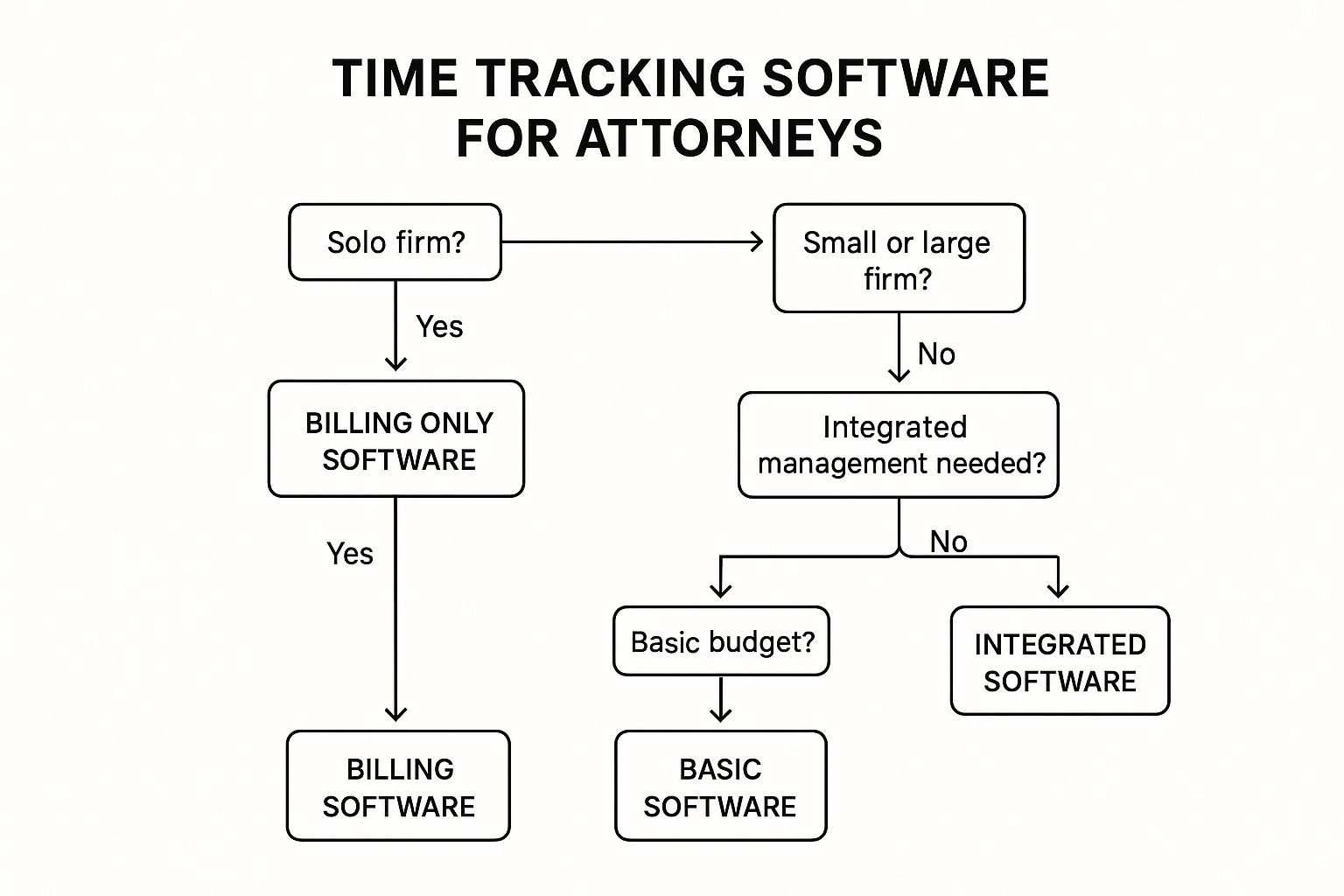
As the graphic shows, there’s no “one-size-fits-all” answer. The best choice is always the one that matches a platform’s strengths to your firm’s specific operational realities.
Prioritize Powerful Integrations
Think of your software suite as a legal team. A standalone time tracker is like a brilliant paralegal who refuses to talk to anyone else—valuable on their own, but a massive drag on efficiency. To get real results, you need integrations.
The goal is to build an automated workflow where data moves between systems without anyone having to touch it. When your time tracker talks directly to your case management platform, every time entry is automatically filed under the correct matter. When it connects to your billing software, invoices are generated and sent with a click, saving hours of mind-numbing data entry.
A well-integrated system is your best defense against human error. By removing the need for manual data transfer, you drastically reduce the risk of billing mistakes, which protects both your revenue and your client relationships.
This connected approach transforms individual tools into a single, unified system. It saves time, boosts accuracy, and creates one source of truth for all of your firm’s financial data.
Explore Practice-Specific Solutions
The legal software market has grown up. We’ve moved past generic, one-size-fits-all tools into an era of specialization. You now have platforms built from the ground up for specific legal niches: MyCase is a favorite among general practice firms, CASEpeer is designed for personal injury attorneys, and Docketwise is tailored for immigration law.
This specialization is changing everything. By 2025, 15 or more major platforms—including giants like Clio, DeskTrack, Toggl Track, and Harvest—will be fiercely competing for market share. Firms are demanding seamless integrations with their case management, billing, and document systems, and that’s driving all the innovation. You can discover more insights about these legal time tracking platforms and the impact they’re having.
When you choose a tool designed for your niche, it often comes pre-loaded with the billing codes, document templates, and workflows you use every single day. That means a much shorter learning curve and immediate value right out of the box.
Create Your Evaluation Checklist
Once you’ve done the internal work, you can build a framework to compare vendors. Don’t let yourself get distracted by flashy features you’ll never use. Focus on the core functions that will actually make a difference in your daily operations.
To help structure your vendor conversations and demos, use a checklist to keep your priorities straight.
Software Selection Checklist for Law Firms
This checklist will help you cut through the marketing noise and compare potential software partners on the criteria that truly matter for your firm’s long-term success.
| Evaluation Criteria | Key Questions to Ask | Importance (High/Medium/Low) |
|---|---|---|
| Security & Compliance | How is our data encrypted? Do you meet ABA guidelines and state bar requirements for client data confidentiality? | High |
| Core Time Tracking Features | Does it offer multiple timers, mobile access, and offline tracking? Are time entries easy to edit and review? | High |
| Integration Capabilities | Does it connect seamlessly with our existing case management, accounting, and document software? | High |
| User Experience (UX) | Is the interface intuitive for both attorneys and support staff? Can we get a free trial to test it with our real workflow? | High |
| Onboarding & Support | What does implementation look like? What kind of training and ongoing technical support do you provide? Is it included? | Medium |
| Reporting & Analytics | Can we easily generate reports on attorney productivity, matter profitability, and client billing histories? | Medium |
| Pricing & Scalability | Is the pricing structure transparent? Are there hidden fees? Can the software grow with our firm over the next five years? | Medium |
| Practice-Specific Needs | Does it support the specific billing codes (e.g., LEDES, UTBMS) or workflows common to our practice area? | Low |
With this structured approach, you can make an informed decision and choose a time tracking partner that will become a true asset to your firm, driving both profitability and efficiency for years to come.
Your Guide to a Successful Software Rollout

Choosing the right attorney time tracking software is a major milestone, but it’s only the beginning. The real test is getting your team to actually use it. A rushed or disorganized rollout can breed frustration, guarantee low adoption, and ultimately turn a valuable investment into shelfware.
To see an immediate return, you need a smart, deliberate plan. This isn’t about flipping a switch and hoping for the best. It’s about creating a smooth transition that minimizes disruption and quickly proves the software’s value. The goal is to weave the new system into your firm’s daily fabric, not just add another icon to your desktop.
Appoint a Project Lead
Your first move should be to appoint a project lead. This person is your internal champion for the new software. They’ll be the main point of contact for the vendor and the go-to person for your team’s questions. Think of them less as a tech guru and more as an organizer and communicator.
This person will own the rollout, handling key responsibilities like:
- Coordinating with the vendor for training and data migration.
- Building a realistic timeline that everyone can follow.
- Keeping the firm updated on progress and important dates.
Putting one person in charge keeps the process from drifting. It centralizes accountability and ensures that critical steps don’t fall through the cracks.
Plan Your Data Migration and Training
Moving your existing client lists, matter numbers, and billing histories is a delicate operation. Get on the phone with your new software provider early to map out exactly what data can be imported and how it needs to be formatted. A clean transfer from day one is non-negotiable if you want to avoid dealing with legacy headaches.
Once the data plan is set, focus on training. Generic, one-size-fits-all sessions are a waste of time. Your attorneys have different needs than your paralegals or billing staff. Tailor the training to each role. Attorneys need to master capturing time on the fly, while your admin team needs to understand the nuts and bolts of invoicing and reporting.
A successful training program answers the “what’s in it for me?” question. Show attorneys how this tool eliminates the agony of reconstructing timesheets at the end of the month. Demonstrate how it helps them capture more billable hours with less effort.
When you frame training around direct personal benefits, it stops feeling like a mandatory chore and starts looking like a solution. That’s how you get buy-in.
Master Change Management for High Adoption
The biggest obstacle you’ll face isn’t the technology—it’s human nature. People resist change. To overcome this, you have to be proactive. It’s not enough to say the new system is better; you must show each person how it makes their specific tasks easier.
Here are a few practical tips to ensure everyone gets on board:
- Run a Parallel Period: For the first week or two, have your team use the new system alongside the old one. This provides a safety net and lets people build confidence without the fear of making a critical mistake.
- Create Simple Internal Guidelines: No one wants to read a 50-page manual. Develop a one-page “quick start” guide that covers the essentials: starting a timer, adding an expense, and submitting a timesheet.
- Celebrate Early Wins: When you see a team member mastering the software, acknowledge it. Highlighting positive experiences and pointing out efficiency gains creates momentum and encourages others to get with the program.
By taking a structured, human-centric approach, you can ensure your firm doesn’t just adopt the new attorney time tracking software—it thrives with it from the moment you go live.
Frequently Asked Questions
Even after seeing the benefits, jumping into attorney time tracking software can bring up a few specific questions. Let’s get straight to the most common ones so you can move forward with confidence.
How Does This Software Ensure Billing Accuracy and Compliance?
Think of modern time tracking software as a fortress against billing errors and a champion for ethical compliance. It moves you away from the guesswork of manual logs and into the world of digital precision.
First, real-time, automated features capture every single billable moment as it happens—from firing off an email to a quick research dive. This stops those small, easily forgotten time increments from slipping through the cracks by the end of the day.
Many platforms also enforce standardized billing formats, like the Uniform Task-Based Management System (UTBMS) codes often required by corporate clients. This ensures every invoice and every attorney is speaking the same language, which is fundamental to compliance.
The software forces you to add detailed descriptions for each time entry. This habit creates incredibly transparent invoices that clients understand and are far more defensible if a billing dispute ever arises.
Finally, built-in review tools let a partner or administrator scan all timesheets for accuracy before any invoice goes out the door. It’s a powerful final check that upholds the highest standards of billing integrity.
Can Small Law Firms or Solo Practitioners Benefit?
Absolutely. In fact, small firms and solo practitioners often see the biggest and fastest return on their investment. The very challenges they face—limited admin support and the need to squeeze value from every billable hour—are exactly what these tools are designed to solve.
For a solo attorney, the hours clawed back from non-billable admin tasks are a game-changer. Automating time capture and invoicing frees them up to focus on what actually grows the business: serving clients.
The market is also full of affordable, tiered pricing plans built specifically for smaller practice budgets. A solo lawyer can boost their annual revenue just by capturing previously lost time, making the software an incredibly profitable investment. The professional, detailed invoices it generates also build client trust—a vital asset for any smaller firm’s reputation.
What Is the Difference Between Active and Passive Time Tracking?
The key difference between active and passive time tracking really comes down to how involved you need to be. It’s like the difference between manually steering a car and switching on cruise control.
Active time tracking is the manual approach. You have to physically start and stop a timer for every task or try to piece your day back together from memory. While it gives you direct control, it’s wide open to human error—it’s just too easy to forget to start a timer or miscalculate how long something took.
Passive time tracking, on the other hand, runs automatically in the background. It quietly monitors your activity on the computer—work in specific documents, emails sent, calendar events—and uses that data to suggest time entries for you to simply review, edit, and approve.
Here’s the simple breakdown:
- Active Tracking: You do all the work, requiring conscious effort and manual input.
- Passive Tracking: The software does the heavy lifting, capturing activity automatically for your final sign-off.
Passive tracking is designed to catch every billable second without you having to think about it, dramatically cutting down on lost revenue and the headache of manual timekeeping. Most modern attorney time tracking software platforms now offer a hybrid approach, letting you pick the method that fits your workflow best.
Is This Software Secure for Handling Confidential Client Data?
Security is non-negotiable in the legal field, and any reputable software provider knows this. Top-tier platforms are built from the ground up with robust security measures to protect sensitive client information and ensure you stay compliant with professional ethics.
You should expect to see several key security features:
- Data Encryption: All your data—whether it’s stored on a server or being transmitted—is protected with strong encryption. This makes the information completely unreadable to any unauthorized party.
- Role-Based Access Control: You can set specific user permissions, ensuring attorneys and staff only access the information they absolutely need for their roles. This prevents anyone from seeing sensitive case or financial data they shouldn’t.
- Regular Security Audits: The best providers constantly run vulnerability scans and security audits to find and fix potential weaknesses before they become a problem.
- Compliance with Legal Standards: Many platforms are explicitly designed to help firms meet the strict data confidentiality requirements set by the American Bar Association (ABA) and state bars.
By choosing a well-regarded provider that puts security first, you can be confident that your firm’s—and your clients’—data is in safe hands.
Elevating your law firm’s brand and connecting with high-net-worth clients requires more than just excellent legal work—it requires elite visibility. The Haute Lawyer Network is a curated platform that showcases top attorneys through Haute Living’s powerful media ecosystem, aligning your practice with luxury and prestige. Discover how our network can amplify your reputation and open doors to an exclusive clientele by visiting us at https://hauteliving.com/lawyernetwork.